


Na maioria das vezes é útil utilizar componentes de listas conhecidos como Combobox ou Dropdown para mostrar relacionamentos de dados entre tabelas e de uma forma amigável exibir a descrição dos itens de dados e manipular seu identificador único. Para isto o ASP.NET nos disponibiliza componentes e classes no qual nos permite manipular dados através de objetos e persisti-los em um banco de dados relacional usando o NHibernate. Um relacionamento de dados mais simples é criado através de duas tabelas, sendo uma tabela pai que contem os dados mestres e uma filho que contem um ou mais identificadores relacionados ao pai. Um modo de fácil de identificar e tradicional de utilizar relacionamentos em um banco de dados é através de chaves estrangeiras, uma chave estrangeira é um campo, que aponta para a chave primária de outra tabela ou da mesma tabela. Ou seja, passa a existir uma relação entre duas tabelas ou de uma única tabela. A finalidade da chave estrangeira é garantir a integridade dos dados referenciais, pois apenas serão permitidos valores que supostamente vão aparecer na base de dados e estão ligados ao registro mestre.
O C# nos disponibiliza uma facilidade para manipular dados em seus controles e objetos, pois alguns de seus controles possuem a herança da classe BaseDataBoundControl e nos contempla com a propriedade DataSource, que obtém ou define o objeto do qual o controle vinculado aos dados recupera sua lista de itens de dados. Está propriedade é muito similar e remete automaticamente à lembrança dos objetos da linguagem de programação Object Pascal (Delphi).
BaseDataBoundControl Class:
Exibindo Relacionamentos
1 – Primeiro crie duas tabelas e seus respectivos objetos no banco de dados Oracle, atente-se para a chave estrangeira que cria o relacionamento entre as tabelas usando a chave primaria da tabela pai:
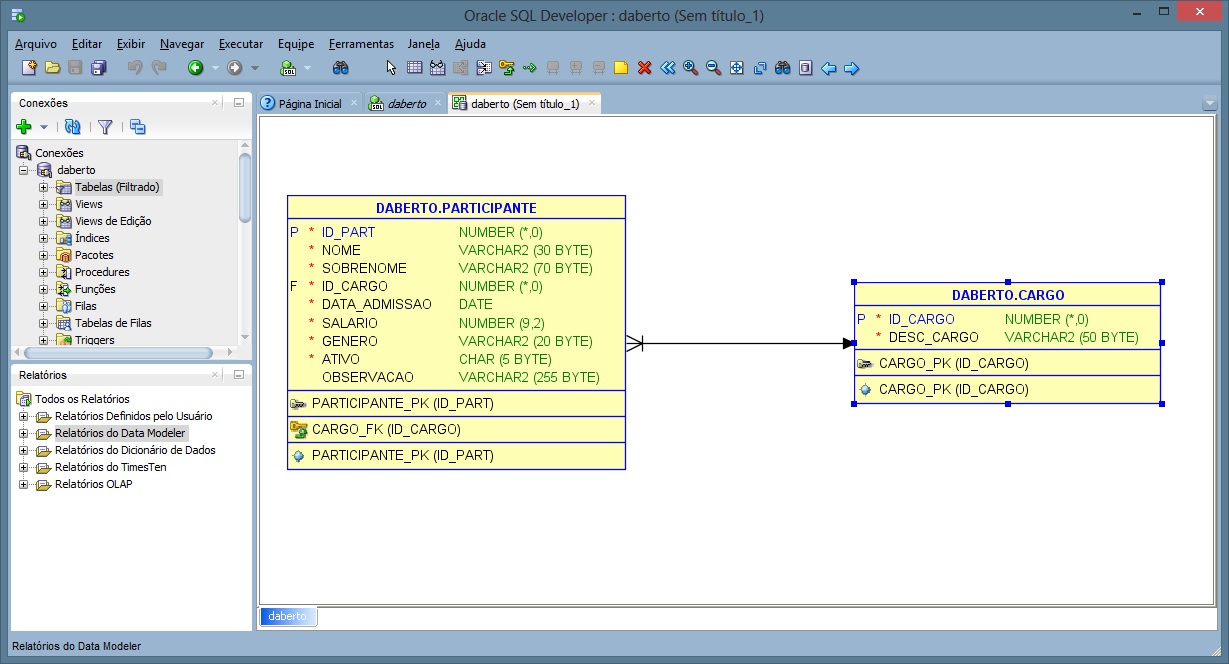
Oracle – Relacionamento
2 – Crie uma aplicação ASP.NET do tipo C# Empty, configure seu projeto com as referencias necessárias para o NHibernate e Oracle Database. Utilize os códigos abaixo e rode sua aplicação:
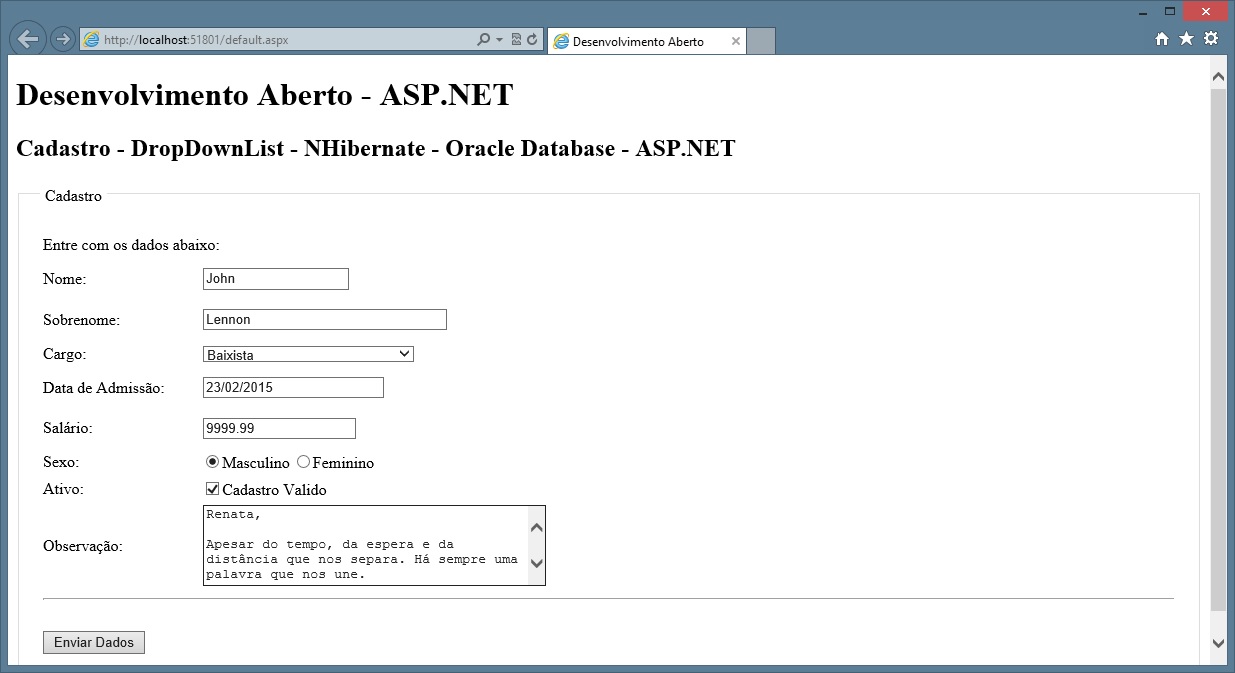
ASP.NET – Aplicação
3 – Assim que os dados forem enviados o NHibernate gravará o conteúdo dos objetos no banco de dados relacional, você pode verificar na pagina que mostramos a descrição do campo cargo toda vez que utilizamos os dados da tabela de Cargos, porem na tabela Participante apenas seu identificador é gravado formando o relacionamento entre as duas tabelas:
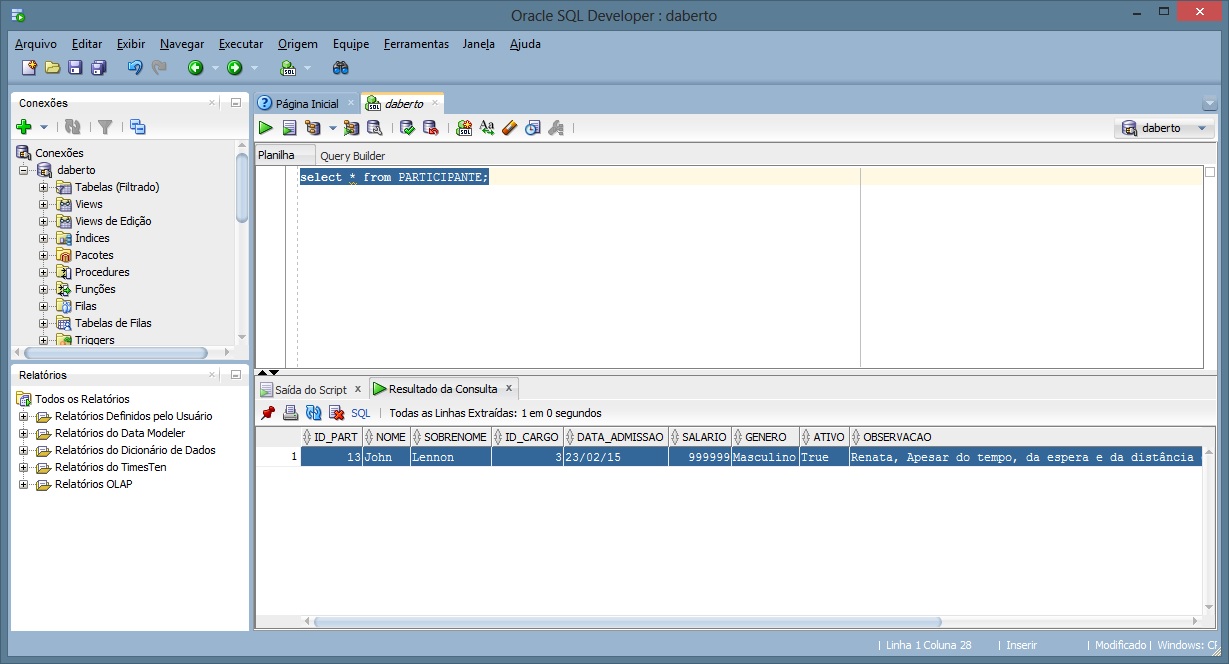
Oracle – Relacionamento – Chave Estrangeira
Exemplo:
Neste exemplo criamos duas tabelas no banco de dados Oracle e as relacionamos através da chave primaria e uma chave estrangeira. Usamos um elemento ASP.NET para tornar este relacionamento amigável, exibindo assim a descrição do relacionamento mas manipulando seu identificador e os persistindo através do NHibernate.
SQL
-- Cria Sequence Participante
CREATE SEQUENCE SEQ_PARTICIPANTE
 START WITH     1
 INCREMENT BY   1
 NOCACHE
 NOCYCLE;

-- Cria tabela de participantes
CREATE TABLE PARTICIPANTE
(
  ID_PART INTEGER NOT NULL
, NOME VARCHAR2(30) NOT NULL
, SOBRENOME VARCHAR2(70) NOT NULL
, ID_CARGO INTEGER NOT NULL
, DATA_ADMISSAO DATE NOT NULL
, SALARIO NUMBER(9,2) NOT NULL
, GENERO VARCHAR2(20) NOT NULL
, ATIVO CHAR(5) NOT NULL
, OBSERVACAO VARCHAR2(255)
, CONSTRAINT PARTICIPANTE_PK PRIMARY KEY
  (
    ID_PART
  )
  ENABLE
);

-- Cria Sequence Cargo
CREATE SEQUENCE SEQ_CARGO
 START WITH     1
 INCREMENT BY   1
 NOCACHE
 NOCYCLE;

-- Cria tabela de cargo
Create Table CARGO (
 ID_CARGO INTEGER NOT NULL,
 DESC_CARGO VARCHAR2(50) NOT NULL,

CONSTRAINT CARGO_PK PRIMARY KEY
  (
     ID_CARGO
  )
  ENABLE

);

-- Alimenta dados na tabela de cargos
insert into cargo values (SEQ_CARGO.NEXTVAL , 'Vocalista');
insert into cargo values (SEQ_CARGO.NEXTVAL, 'Guitarrista');
insert into cargo values (SEQ_CARGO.NEXTVAL, 'Baixista');
insert into cargo values (SEQ_CARGO.NEXTVAL, 'Baterista');

-- Cria Contraint chave estrangeira
ALTER TABLE PARTICIPANTE ADD CONSTRAINT CARGO_FK
FOREIGN KEY  (ID_CARGO) REFERENCES CARGO (ID_CARGO);
Web.config
<?xml version="1.0" encoding="utf-8"?>
<!--
  For more information on how to configure your ASP.NET application, please visit
  http://go.microsoft.com/fwlink/?LinkId=169433
  -->
<configuration>
  <system.web>
    <compilation debug="true" targetFramework="4.5" />
    <httpRuntime targetFramework="4.5" />
  </system.web>

  <appSettings>
    <add key="ValidationSettings:UnobtrusiveValidationMode" value="None"/>
  </appSettings>

</configuration>
Hibernate.cfg.xml
<?xml version="1.0" encoding="utf-8" ?>
<hibernate-configuration xmlns="urn:nhibernate-configuration-2.2">
  <session-factory>
    <property name="connection.provider">NHibernate.Connection.DriverConnectionProvider</property>
    <property name="dialect">NHibernate.Dialect.Oracle10gDialect</property>
    <property name="connection.driver_class">NHibernate.Driver.OracleDataClientDriver</property>
    <property name="connection.connection_string">
      User Id=user;
      Password=pass;
      Data Source=XE;
      Pooling=true;
      Enlist=false;
      Statement Cache Size=50;
      Min Pool Size=10;
      Incr Pool Size=5;
      Decr Pool Size=2;
    </property>
    <property name="show_sql">true</property>
  </session-factory>
</hibernate-configuration>
Participante
using System;
using System.Collections.Generic;
using System.Linq;
using System.Web;

namespace DAWebApp001
{
    public class Participante
    {

        // Declara atributos publicos
        private long id;
        private string nome;
        private string sobrenome;
        private int cargo;
        private DateTime data;
        private double salario;
        private string genero;
        private Boolean ativo;
        private string observacao;

       // Declara propriedades
        public long Id
        {
            get { return id; }
            set { id = value; }
        }

        public string Nome
        {
            get { return nome; }
            set { nome = value; }
        }

        public string Sobrenome
        {
            get { return sobrenome; }
            set { sobrenome = value; }
        }

        public int Cargo
        {
            get { return cargo; }
            set { cargo = value; }
        }

        public DateTime Data
        {
            get { return data; }
            set { data = value; }
        }

        public double Salario
        {
            get { return salario; }
            set { salario = value; }
        }

        public string Genero
        {
            get { return genero; }
            set { genero = value; }
        }

        public Boolean Ativo
        {
            get { return ativo; }
            set { ativo = value; }
        }

        public string Observacao
        {
            get { return observacao; }
            set { observacao = value; }
        }
    }
}
ParticipanteRepository
using DAWebApp001.Models;
using NHibernate;
using System;
using System.Collections.Generic;
using System.Linq;
using System.Web;

namespace DAWebApp001
{
    public class ParticipanteRepository
    {
        public void Add(ParticipanteModelo participante)
        {
            // Cria sessão
            using (ISession session = DbConexaoFactory.OpenSession())
            {
                // Cria transação
                using (ITransaction transaction = session.BeginTransaction())
                {
                    // Salva e finaliza
                    session.Save(participante);
                    transaction.Commit();
                }
            }
        }

        public IList<CargoModelo> retornaCargos()
        {
            // Abre conexão
            using (ISession session = DbConexaoFactory.OpenSession())
            {

                // Cria transação
                using (ITransaction transaction = session.BeginTransaction())
                {

                    // Retorna dados e finaliza.
                    var itens =  session.CreateQuery("FROM CargoModelo").List<CargoModelo>();
                    transaction.Commit();

                    return itens;
                }
            }

        }

    }
}
DBConcexaoFactory
using DAWebApp001.Models;
using NHibernate;
using NHibernate.Cfg;
using System;
using System.Collections.Generic;
using System.Linq;
using System.Web;

namespace DAWebApp001
{
    public class DbConexaoFactory
    {
        private static ISessionFactory _sessionFactory;

        private static ISessionFactory SessionFactory
        {
            get
            {
                if (_sessionFactory == null)
                {
                    var configuration = new Configuration();
                    configuration.Configure();
                    configuration.AddAssembly(typeof(ParticipanteModelo).Assembly);
                    _sessionFactory = configuration.BuildSessionFactory();
                }
                return _sessionFactory;
            }
        }

        public static ISession OpenSession()
        {
            return SessionFactory.OpenSession();
        }

    }
}
ParticipanteModelo
using System;
using System.Collections.Generic;
using System.Linq;
using System.Web;

namespace DAWebApp001.Models
{
    public class ParticipanteModelo
    {
        // Declara atributos publicos
        private int id_part;
        private string nome;
        private string sobrenome;
        private int cargo;
        private DateTime data_admissao;
        private double salario;
        private string genero;
        private string ativo;
        private string observacao;

        // Declara propriedades
        public virtual int Id_Part
        {
            get { return id_part; }
            set { id_part = value; }
        }

        public virtual string Nome
        {
            get { return nome; }
            set { nome = value; }
        }

        public virtual string Sobrenome
        {
            get { return sobrenome; }
            set { sobrenome = value; }
        }

        public virtual int Cargo
        {
            get { return cargo; }
            set { cargo = value; }
        }

        public virtual DateTime Data_Admissao
        {
            get { return data_admissao; }
            set { data_admissao = value; }
        }

        public virtual double Salario
        {
            get { return salario; }
            set { salario = value; }
        }

        public virtual string Genero
        {
            get { return genero; }
            set { genero = value; }
        }

        public virtual string Ativo
        {
            get { return ativo; }
            set { ativo = value; }
        }

        public virtual string Observacao
        {
            get { return observacao; }
            set { observacao = value; }
        }
    }
}
ParticipanteModelo.hbm.xml
<?xml version="1.0" encoding="utf-8" ?>
<hibernate-mapping xmlns="urn:nhibernate-mapping-2.2"
                   assembly="DAWebApp001"
                   namespace="DAWebApp001.Models">

  <class name="ParticipanteModelo" table="PARTICIPANTE">
    <id name="Id_Part" column="ID_PART">
      <generator class="native" >
        <param name="sequence">SEQ_PARTICIPANTE</param>
      </generator>
    </id>
    <property name="Nome"  column="NOME"/>
    <property name="Sobrenome" column="SOBRENOME"/>
    <property name="Cargo" column="ID_CARGO" />
    <property name="Data_Admissao" column="DATA_ADMISSAO" />
    <property name="Salario" column="SALARIO"/>
    <property name="Genero" column="GENERO" />
    <property name="Ativo" column="ATIVO"/>
    <property name="Observacao" column="OBSERVACAO" />
  </class>

</hibernate-mapping>
CargoModelo
using System;
using System.Collections.Generic;
using System.Linq;
using System.Web;

namespace DAWebApp001.Models
{
    public class CargoModelo
    {
        // Declara atributos
        private int id_cargo;
        private string desc_cargo;

        // Declara propriedades virtuais
        public virtual int Id_cargo
        {
            get { return id_cargo; }
            set { id_cargo = value; }
        }

        public virtual string  Desc_cargo
        {
            get { return desc_cargo; }
            set { desc_cargo = value; }
        }

    }
}
CargoModelo.hbm.xml
<?xml version="1.0" encoding="utf-8" ?>
<hibernate-mapping xmlns="urn:nhibernate-mapping-2.2"
                   assembly="DAWebApp001"
                   namespace="DAWebApp001.Models">

  <class name="CargoModelo" table="CARGO">
    <id name="Id_cargo" column="ID_CARGO">
      <generator class="native" >
        <param name="sequence">SEQ_CARGO</param>
      </generator>
    </id>
    <property name="Desc_cargo"  column="DESC_CARGO"/>
  </class>

</hibernate-mapping>
Default.aspx
<%@ Page Language="C#" AutoEventWireup="true" CodeBehind="default.aspx.cs" Inherits="DAWebApp001._default" %>
<!DOCTYPE html>
<html xmlns="http://www.w3.org/1999/xhtml">
<head runat="server">
<title>Desenvolvimento Aberto</title>
<style type="text/css">
.auto-style2 {
width: 14%;
}
.auto-style3 {
height: 23px;
}
.auto-style5 {
width: 248px;
}
.auto-style6 {
width: 54%;
}
.auto-style8 {
height: 23px;
width: 54%;
}
.auto-style9 {
height: 23px;
width: 248px;
}
</style>
</head>
<body>
<h1>Desenvolvimento Aberto - ASP.NET</h1>
<h2>Cadastro - DropDownList - NHibernate - Oracle Database - ASP.NET</h2>
<form id="form1" runat="server">
<div>
<fieldset style="padding: 20px">
<legend style="padding: 5px">Cadastro</legend>
<table style="width: 100%;">
<tr>
<td class="auto-style3" colspan="2">
<asp:Label ID="LabelMenssagem" runat="server" Text="Entre com os dados abaixo:"></asp:Label>
</td>
<td class="auto-style8"></td>
</tr>
<tr>
<td class="auto-style2">
<asp:Label ID="Label2" runat="server" Text="Nome:"></asp:Label>
</td>
<td class="auto-style5">
<asp:TextBox ID="TextBox1nome" onMouseOver="meuMouseOver()" onMouseOut="meuMouseOut()" runat="server" Width="142px"></asp:TextBox>
</td>
<td class="auto-style6">
<asp:RequiredFieldValidator ID="RequiredFieldValidator1" runat="server" ControlToValidate="TextBox1nome" ErrorMessage="Nome é obrigatório." ForeColor="Red" ValidationGroup="AllValidator"></asp:RequiredFieldValidator>
<br />
<asp:RegularExpressionValidator ID="RegularExpressionValidator1" runat="server" ControlToValidate="TextBox1nome" ErrorMessage="Permitido somente caractere alphanumericos" ForeColor="Red" ValidationExpression="[a-zA-Z]+" ValidationGroup="AllValidator"></asp:RegularExpressionValidator>
</td>
</tr>
<tr>
<td class="auto-style3">
<asp:Label ID="Label3" runat="server" Text="Sobrenome:"></asp:Label>
</td>
<td class="auto-style9">
<asp:TextBox ID="TextBox2sobrenome" runat="server" Width="240px"></asp:TextBox>
</td>
<td class="auto-style8">
<asp:RequiredFieldValidator ID="RequiredFieldValidator2" runat="server" ControlToValidate="TextBox2sobrenome" ErrorMessage="Sobrenome é obrigatório." ForeColor="Red" ValidationGroup="AllValidator"></asp:RequiredFieldValidator>
<br />
<asp:RegularExpressionValidator ID="RegularExpressionValidator2" runat="server" ControlToValidate="TextBox2sobrenome" ErrorMessage="Permitido somente caractere alphanumericos" ForeColor="Red" ValidationExpression="[a-zA-Z]+" ValidationGroup="AllValidator"></asp:RegularExpressionValidator>
</td>
</tr>
<tr>
<td class="auto-style3">
<asp:Label ID="Label4" runat="server" Text="Cargo:"></asp:Label>
</td>
<td class="auto-style9">
<asp:DropDownList ID="DropDownList1" runat="server" Height="16px" Width="211px">
</asp:DropDownList>
</td>
<td class="auto-style8">
<asp:RequiredFieldValidator ID="RequiredFieldValidator3" runat="server" ControlToValidate="DropDownList1" ErrorMessage="Cargo é obrigatório." ForeColor="Red" ValidationGroup="AllValidator"></asp:RequiredFieldValidator>
<br />
</td>
</tr>
<tr>
<td class="auto-style3">
<asp:Label ID="Label6" runat="server" Text="Data de Admissão:"></asp:Label>
</td>
<td class="auto-style9">
<asp:TextBox ID="TextBox1Data" runat="server" Width="177px"></asp:TextBox>
</td>
<td class="auto-style8">
<asp:RequiredFieldValidator ID="RequiredFieldValidator5" runat="server" ControlToValidate="TextBox1Data" ErrorMessage="Data de admissão é obrigatória." ForeColor="Red" ValidationGroup="AllValidator"></asp:RequiredFieldValidator>
<br />
<asp:RegularExpressionValidator ID="RegularExpressionValidator5" runat="server" ControlToValidate="TextBox1Data" ErrorMessage="Formato de data invalido, use (dd/mm/yyyy)." ForeColor="Red" ValidationExpression="^(?:(?:31(\/|-|\.)(?:0?[13578]|1[02]))\1|(?:(?:29|30)(\/|-|\.)(?:0?[1,3-9]|1[0-2])\2))(?:(?:1[6-9]|[2-9]\d)?\d{2})$|^(?:29(\/|-|\.)0?2\3(?:(?:(?:1[6-9]|[2-9]\d)?(?:0[48]|[2468][048]|[13579][26])|(?:(?:16|[2468][048]|[3579][26])00))))$|^(?:0?[1-9]|1\d|2[0-8])(\/|-|\.)(?:(?:0?[1-9])|(?:1[0-2]))\4(?:(?:1[6-9]|[2-9]\d)?\d{2})$" ValidationGroup="AllValidator"></asp:RegularExpressionValidator>
</td>
</tr>
<tr>
<td class="auto-style3">
<asp:Label ID="Label5" runat="server" Text="Salário:"></asp:Label>
</td>
<td class="auto-style9">
<asp:TextBox ID="TextBox4salario" runat="server"></asp:TextBox>
</td>
<td class="auto-style8">
<asp:RequiredFieldValidator ID="RequiredFieldValidator4" runat="server" ControlToValidate="TextBox4salario" ErrorMessage="Salário é obrigatório. " ForeColor="Red" ValidationGroup="AllValidator"></asp:RequiredFieldValidator>
<br />
<asp:RegularExpressionValidator ID="RegularExpressionValidator4" runat="server" ControlToValidate="TextBox4salario" ErrorMessage="Permitido somente caractere numericos e decimais." ForeColor="Red" ValidationExpression="(?:\d*\.)?\d+" ValidationGroup="AllValidator"></asp:RegularExpressionValidator>
</td>
</tr>
<tr>
<td class="auto-style3">
<asp:Label ID="Label7" runat="server" Text="Sexo:"></asp:Label>
</td>
<td class="auto-style9">
<asp:RadioButton ID="RadioButton1" runat="server" GroupName="Grupo1" Text="Masculino" />
<asp:RadioButton ID="RadioButton2" runat="server" GroupName="Grupo1" Text="Feminino" />
</td>
<td class="auto-style8">
<br />
</td>
</tr>
<tr>
<td class="auto-style3">
<asp:Label ID="Label8" runat="server" Text="Ativo:"></asp:Label>
</td>
<td class="auto-style9">
<asp:CheckBox ID="CheckBox1" runat="server" Text="Cadastro Valido" />
</td>
<td class="auto-style8">
<br />
</td>
</tr>
<tr>
<td class="auto-style3">
<asp:Label ID="Label9" runat="server" Text="Observação:"></asp:Label>
</td>
<td class="auto-style9">
<asp:TextBox ID="TextBox1Observacao" runat="server" Columns="40" Rows="5" TextMode="MultiLine"></asp:TextBox>
</td>
<td class="auto-style8"> </td>
</tr>
<tr>
<td class="auto-style3" colspan="3">
<hr />
</td>
</tr>
<tr>
<td class="auto-style3">
<asp:Button ID="Button1enviardados" runat="server" Text="Enviar Dados" OnClick="Button1enviardados_Click" ValidationGroup="AllValidator" />
</td>
<td class="auto-style9"> </td>
<td class="auto-style8"> </td>
</tr>
</table>
</fieldset>
</div>
</form>
</body>
</html>
Default.aspx.cs
using DAWebApp001.Models;
using NHibernate.Cfg;
using NHibernate.Tool.hbm2ddl;
using System;
using System.Collections.Generic;
using System.Linq;
using System.Web;
using System.Web.UI;
using System.Web.UI.WebControls;


namespace DAWebApp001
{
    public partial class _default : System.Web.UI.Page
    {
        protected void Page_Load(object sender, EventArgs e)
        {
            // Verifica se a pagina foi carregada pela primeira vez
            if (!Page.IsPostBack)
            {
                // Configura Hibernate
                LoadNHibernateCfg();

                // Cria repositorio par o objeto
                ParticipanteRepository repositorio = new ParticipanteRepository();

                // Retorna set de dados
                IList<CargoModelo> itens = repositorio.retornaCargos();

                // Adiciona set de dados ao Datasource
                DropDownList1.DataSource = itens;
                DropDownList1.DataTextField = "Desc_cargo";
                DropDownList1.DataValueField = "Id_cargo";

                // Liga componente
                DropDownList1.DataBind();

            }

            // Cria objeto na sessão
            Participante participante = new Participante();

            Session["Cadastro"] = participante;

        }

        protected void Button1enviardados_Click(object sender, EventArgs e)
        {
            if (Page.IsValid)
            {
                // Recupera objeto da Session
                Participante cad = (Participante)Session["Cadastro"];

                // Valor normalmente é um autoincremento
                // Ou pelo banco Identity (MSSQL) Sequence (Oracle, DB2, etc)
                // Ou algum framework ORM - NUNCA faça um autoincremento manualmente na aplicação
                cad.Id = 1;

                // Alimenta Objeto
                cad.Nome = TextBox1nome.Text;
                cad.Sobrenome = TextBox2sobrenome.Text;
                cad.Cargo = Convert.ToInt32( DropDownList1.SelectedValue);
                cad.Data = DateTime.Parse(TextBox1Data.Text);
                cad.Salario = Double.Parse(TextBox4salario.Text);

                // Verifica valores boleanos
                if (RadioButton1.Checked)
                {
                    cad.Genero = RadioButton1.Text;
                }

                if (RadioButton2.Checked)
                {
                    cad.Genero = RadioButton2.Text;
                }

                cad.Ativo = CheckBox1.Checked;
                cad.Observacao = TextBox1Observacao.Text;

                // Carrega configuração do NHibernate
                LoadNHibernateCfg();

                // Objeto de transferencia
                transfereParticipante(cad);

                // Redireciona pagina
                Response.Redirect("resultado.aspx");

            }

        }

        private static void transfereParticipante(Participante participante)
        {
            // Define repositorio
            ParticipanteRepository repositorio = new ParticipanteRepository();

            // Define Modelo
            ParticipanteModelo modelo = new ParticipanteModelo();

            // Transfere objeto para o Modelo (Domain)
            // objeto de transferncia é util quando vc tem
            // que converter o tipo de dados antes de gravar

            modelo.Nome = participante.Nome;
            modelo.Sobrenome = participante.Sobrenome;
            modelo.Cargo = participante.Cargo;
            modelo.Data_Admissao = participante.Data;
            modelo.Salario = participante.Salario;
            modelo.Genero = participante.Genero;
            modelo.Ativo = participante.Ativo.ToString();
            modelo.Observacao = participante.Observacao;

            // Grava dados
            repositorio.Add(modelo);

        }

        private static void LoadNHibernateCfg()
        {
            // Carrega configuração NHibernate
            var cfg = new Configuration();
            cfg.Configure();
            cfg.AddAssembly(typeof(ParticipanteModelo).Assembly);

        }
    }
}
Resultado.aspx
<%@ Page Language="C#" AutoEventWireup="true" CodeBehind="resultado.aspx.cs" Inherits="DAWebApp001.resultado" %>
<!DOCTYPE html>
<html xmlns="http://www.w3.org/1999/xhtml">
<head runat="server">
<title></title>
<style type="text/css">
.auto-style1 {
width: 143px;
}
.auto-style2 {
width: 143px;
height: 23px;
}
.auto-style3 {
height: 23px;
}
</style>
</head>
<body>
<form id="form1" runat="server">
<div>
<h1>Desenvolvimento Aberto - ASP.NET</h1>
<h2>Cadastro - Controles - ASP.NET - NHibernate - Oracle Database</h2>
<h3>Dados Gravados com sucesso:</h3>
<table style="width: 100%;">
<tr>
<td class="auto-style1">
<asp:Label ID="Label1" runat="server" Text="Nome:"></asp:Label>
</td>
<td>
<asp:Label ID="lnome" runat="server" Text="Label"></asp:Label>
</td>
<td> </td>
</tr>
<tr>
<td class="auto-style1">
<asp:Label ID="Label2" runat="server" Text="Sobrenome:"></asp:Label>
</td>
<td>
<asp:Label ID="lsobrenome" runat="server" Text="Label"></asp:Label>
</td>
<td> </td>
</tr>
<tr>
<td class="auto-style2">
<asp:Label ID="Label3" runat="server" Text="Cargo:"></asp:Label>
</td>
<td class="auto-style3">
<asp:Label ID="Lcargo" runat="server" Text="Label"></asp:Label>
</td>
<td class="auto-style3"></td>
</tr>
<tr>
<td class="auto-style1">
<asp:Label ID="Label4" runat="server" Text="Data de Admissão:"></asp:Label>
</td>
<td>
<asp:Label ID="ldata" runat="server" Text="Label"></asp:Label>
</td>
<td> </td>
</tr>
<tr>
<td class="auto-style1">
<asp:Label ID="Label5" runat="server" Text="Salário:"></asp:Label>
</td>
<td>
<asp:Label ID="lsalario" runat="server" Text="Label"></asp:Label>
</td>
<td> </td>
</tr>
<tr>
<td class="auto-style1">
<asp:Label ID="Label6" runat="server" Text="Sexo:"></asp:Label>
</td>
<td>
<asp:Label ID="lgenero" runat="server" Text="Label"></asp:Label>
</td>
<td> </td>
</tr>
<tr>
<td class="auto-style2">
<asp:Label ID="Label7" runat="server" Text="Ativo:"></asp:Label>
</td>
<td class="auto-style3">
<asp:Label ID="lativo" runat="server" Text="Label"></asp:Label>
</td>
<td class="auto-style3"></td>
</tr>
<tr>
<td class="auto-style1">
<asp:Label ID="Label8" runat="server" Text="Observação:"></asp:Label>
</td>
<td>
<asp:Label ID="lobservacao" runat="server" Text="Label"></asp:Label>
</td>
<td> </td>
</tr>
<tr>
<td class="auto-style1"> </td>
<td> </td>
<td> </td>
</tr>
</table>
<br />
</div>
</form>
</body>
</html>
Resultado.aspx.cs
using System;
using System.Collections.Generic;
using System.Linq;
using System.Web;
using System.Web.UI;
using System.Web.UI.WebControls;

namespace DAWebApp001
{
    public partial class resultado : System.Web.UI.Page
    {
        protected void Page_Load(object sender, EventArgs e)
        {

            // Recupera objeto
            Participante cad = (Participante)Session["Cadastro"];

            if (Session["Cadastro"] != null)
            {
                // Alimemta valores
                lnome.Text = cad.Nome;
                lsobrenome.Text = cad.Sobrenome;
                Lcargo.Text = cad.Cargo.ToString();
                ldata.Text = cad.Data.ToString();
                lsalario.Text = cad.Salario.ToString();
                lgenero.Text = cad.Genero;
                lativo.Text = cad.Ativo.ToString();
                lobservacao.Text = cad.Observacao;
            }

        }
    }
}
 Ricardo Mantovani
 Desenvolvimento Código Aberto